Shared Pet Care App for Families, Partners and Sitters
Pettify lets everyone who looks after your dog or cat work from the same diary and care plan: invite them by email or QR code and choose who can edit and who can only view. When someone ticks off the walk or the dinner, the others get a notification and the reminder stays quiet on their phones.
$4.99 a month, or $49.99 a year with a 7-day free trial · iPhone, iPad, Mac and Apple Vision Pro
What sharing looks like
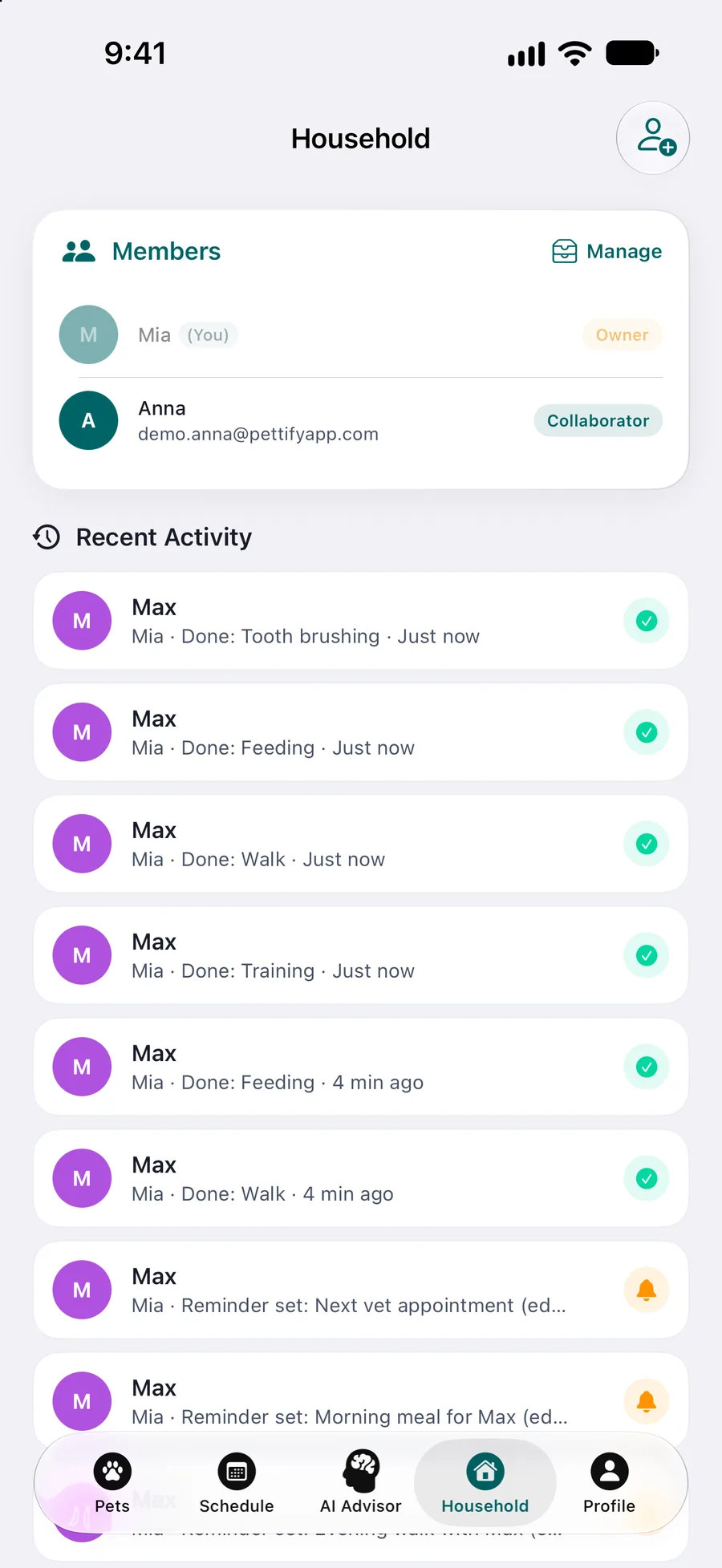
Who’s in, who did what
The Household screen lists the members with their roles and keeps Recent Activity: who ticked off which task, and when.
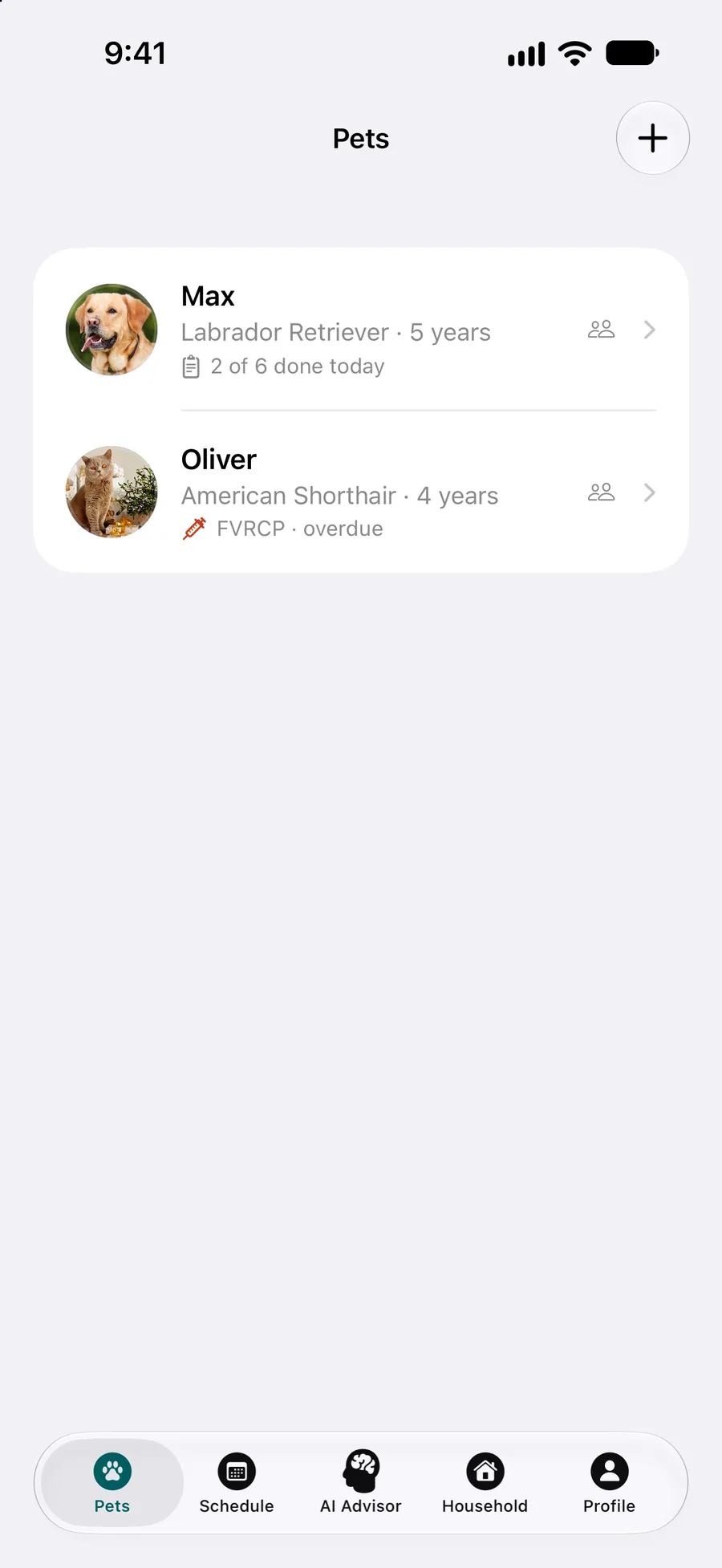
Today at a glance
The pet list shows how much of today’s care is done, 2 of 6 for Max, so anyone at home can check before feeding again.
How it works
Invite
From the Household screen, invite someone by email or let them scan a QR code. Partners, grandparents, kids and teens can all be invited the same way.
Choose edit or view-only
With edit access a member can add and change events, reminders and vaccinations and tick tasks off. View-only lets them see the pet’s data, history and reminders without changing anything.
Share the day
Everyone sees the same diary and care plan. When one person ticks a task off, the others get a notification and its reminder stays quiet on their phones.
What you get
Fed once, not twice
Once a task is ticked off on one phone, its reminder stays quiet on the others. The dog gets one dinner, even when two people come home at six.
No more “did anyone walk her?”
Everyone gets a notification when someone else logs care, and Recent Activity keeps who did what and when, a few taps away instead of in the group chat.
Two clear roles
A collaborator can add and edit events, reminders and vaccinations but can’t delete a pet or manage sharing. A viewer sees the pet’s data, history, reminders and vaccinations and can’t add or edit anything.
Pets shared with you stay apart
In your pet list, the pets that others share with you sit in their own section, so your own pets and the neighbour’s cat don’t get mixed up.
The pee and poop log, too
Toilet entries are shared with everyone the pet is shared with and appear in Recent Activity. A push goes out only for an entry with a warning sign.
What family sharing doesn’t do
Better to know before you download:
Everyone needs an Apple device
Each member uses Pettify on an iPhone, iPad, Mac with Apple silicon or Apple Vision Pro. There is no Android app and no web version, so a partner or sitter with an Android phone can’t join.
Tasks aren’t assigned to a person
Anyone with edit access can tick any task off. If mornings are yours and evenings your partner’s, agree on it at home: the app shows who did it afterwards, not who should.
Siri logs only your own pets
Siri and the app icon shortcuts log pee and poop only for pets in your own account, not for a pet someone shares with you, even with edit access. Use the buttons in the app instead.
Notifications need to be on
Care updates and reminders arrive as notifications. A member who turns off notifications for Pettify still sees everything in the app, but won’t be alerted.
What it costs
The download is free, the app is not. Pettify runs on a Pettify Premium subscription: $4.99 a month, or $49.99 a year with a 7-day free trial first. There is no free tier. You can cancel anytime in your App Store settings. Prices are for the US App Store and may differ in your country.
Choosing between apps? See our pet app comparisons, with prices and features side by side.
Questions about sharing
Can a pet sitter use it while we’re away?
Yes, if the sitter has an iPhone, iPad or Mac. Invite them by email or QR code. View-only lets them see the care plan, reminders and vaccinations; with edit access they can also tick tasks off, and you get a notification when they do.
Can our kids join?
Yes. Kids and teens can be invited like any other member, by email or QR code, with either the edit or the view-only role.
What do family members get notified about?
When someone else logs care, everyone gets a notification, and a ticked-off task stops reminding the others. For the pee and poop log, only an entry with a warning sign sends a push.
Can a viewer change anything?
No. A viewer sees the pet’s data and history, the events, reminders and vaccinations, and the care plan, but can’t add or edit anything. Give edit access to anyone who should tick tasks off.
Can everyone see the vet documents?
Yes. Lab results, photos and PDFs attached to a health record are seen by the family too. The PDF report with those documents inside can be shared straight from the app, for example with a kennel or a sitter.
Leaving your pet with someone?
Make a sitter sheet in a few minutes with the free tool, and print the medication log for whoever gives the doses.
- Weekly care scheduleDaily tasks by day, who does each one and a backup.
- Pet emergency cardWallet cards that say your pets are home alone, plus a fridge sheet.
- Pet sitter instructionsFill in a form and print a care sheet for your sitter.
- Medication logPrintable PDF to note every dose: when, what and who gave it.
More of what Pettify does
- Medication remindersGet a reminder when your dog or cat is due a pill or drops, tick off each dose, and let your family see it’s done so nobody gives it twice. iPhone, iPad, Mac.
- Care remindersReminders for your dog’s or cat’s meals, walks, grooming, baths and nail trims, daily, weekly, monthly or yearly. Tick one off and the family knows. iPhone.
- Pee and poop logLog your puppy’s or cat’s pee and poop with one tap, on a walk or by asking Siri. See counts per day, a chart and hints, shared with your family. iPhone.